I'm very glad for that thread. I didn't know that I also needed to uncheck "Include Spotlight Suggestions" in Safari additionally to Preferences.
I do not understand why there's such a backlash against anyone that points out that:
1. It's not intuitive to have to both disable "Include Spotlight Suggestions" in Safari and in Preferences.
2. People like my father who are privacy conscious but are average computer users would not think to look for this in Spotlight and Search and instead would look in the privacy tab instead
3. Apple released and advertises cool privacy features like MAC address randomization that actually do not work. It only works with Location Services and 3G disabled according to the reports which is never going to happen. This makes me feel that the new focus on privacy from Apple is more for PR purpose than something they really care for.
That said, I like Apple products, I've been using macs since 2004 and I would have a hard time going back to using Linux (still have nightmares about all the work needed to support my laptop correctly) but that doesn't mean I'm giving them a pass on those privacy issues.
I know a lot of people here feel that all of this is much ado about nothing but really, it's clearly not obvious and if I hadn't read yesterday's thread I wouldn't have been aware that Safari sends my search to Apple even if selected Duck Duck Go and disabled Spotlight Suggestions in preferences.
> This makes me feel that the new focus on privacy from Apple is more for PR purpose than something they really care for.
It may well be something that some parts of the organisation care about, but clearly it is not something that the UX people designing the settings applets care about (assuming such people exist; for a company generally very good at UI and UX, Apple tends to have very confusing settings stuff).
>This makes me feel that the new focus on privacy from Apple is more for PR purpose than something they really care for.
Clearly they are doing it for their own purposes, and your post is fair comment, but if their interests and their customer's interests align then that's good for both sides.
It's also possible that while their current privacy oriented features leave gaps that are exploitable, that's just because the remaining gaps are trickier to address and will just take longer. Also just because elements of the communications infrastructure they don't control may be open, that doesn't mean they should therefore leave the elements of it they do control open as well. It certainly doesn't mean that them locking down those elemts is somehow necessarily a cynical move. That's not the sort of attitude I think we should be taking as it explicitly penalises and discourages individuals and companies from even trying to improve things.
I agree with you but in the case of the MAC address randomization, the fact that they don't work according to reports when location services or cellular data is turned on seems more like a bug due to insufficient QA. I really can't see any technical reasons why MAC address randomization would be disabled if location services or cellular data is enabled.
I'm happy that they try to talk about privacy but for now I give them some flak because they're advertising this feature which actually never works for normal users (who turns off their cellular data before closing their phone?).
For my points #1 and #2, I think it's mostly an oversight in term of UI design but again Apple is well known for it's attention to details in UI design and this feels half baked like if they didn't spend time thinking about privacy implications and the way users actually behave. My disappointment is because I expected better from Apple, they usually are very good at clear UI design and thinking through things like this.
I hope I'm proven wrong and that Apple really delivers on its promises when it comes to privacy but right now, there's still some way to go beyond the speeches and ads that have been made.
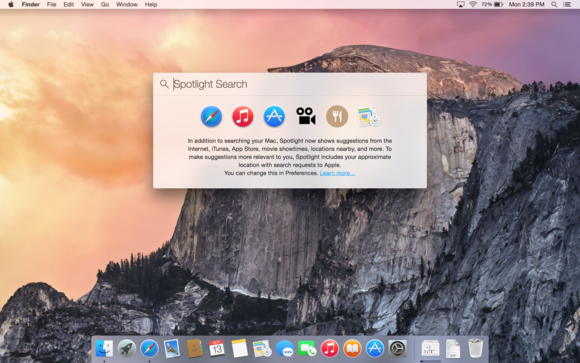
The text when you open spotlight explains that it's looking on the internet. The first icon is safari. Every search you do, including siri, kortana, and ok google sends information to the respective company. Apparently bendgate didn't satisfy the fans, so they had to come up with a tortured reason to be all upset. I really tire of this horse shit, and would expect better.
I disabled spotlight suggestions in the preferences but didn't in Safari (since it never came into my mind that I'd need to disable it there too).
When I searched on safari, I didn't see spotlight suggestions but I can confirm that it phoned home.
I don't get why people get so defensive when it's just a simple fact. Even someone technically minded like me who actually disabled Spotlight suggestions in Preferences because I didn't want to send information to Apple, ended up sending information when searching on Safari. This is an issue.
I expect Safari to communicate with the web, I just don't expect it to send my search data to apple's server when I selected Duck Duck Go as a search engine and when I disabled Spotlight suggestion in the preferences. Having to disable "Spotlight suggestion" a second time in Safari's preferences is the issue and is what I blame Apple.
That Mail one is probably the least alarming, and I would assume that Outlook does the same thing. When you first set up a mail account, it sends your email domain to https://mac-services.apple.com/iconfig/dconf and, provided Apple has a match for it, it will return auto-configure POP/IMAP/SMTP settings.
If you enter your email as @apple.com, it returns back:
Funny - just compare how Ubuntu was bashed for Amazon lens in Unity and how differently Apple is treated for the same (or even worse) things here on HN
I see the opposite, but I always try to remind myself that it's just my (and your) bias showing and not comment on it, because I would almost certainly be wrong.
For example, the highly inflammatory title for yesterday's submission (no privacy by design) stayed unmoderated for the entire day, until it went off the front page.
This issue has had multiple submissions in the past two days and they received plenty of votes, it doesn't seem "HN" is giving it preferential treatment.
My concern was that if I wanted to buy something, I'd go online and look for it. If I wanted to run an application, I'd search for it. It was a case of extremely terrible UX and wasted my time having to disable it each time I installed Ubuntu.
'apt-get remove unity-shopping-lens' hardly consumes a lot of time, particularly since you make it sound like you installed Ubuntu often enough to make it onerous - that often, and you'd remember the command without having to web-search for it.
no - I'm suggesting both situations are equally unpleasant for users and HN crowd tends to absolve Apple for any 'crimes' they commit - it's just funny
(I'm using both Ubuntu and Mac on a regular basis)
I'm not clear why it's unpleasant and the pejorative use of 'crime' is one that puts my back up over this. Spotlight's function is clearly stated and easily disabled. It is simply alarmism and sensationalism. The same can be reasonably said of the Amazon/Ubuntu debacle. TFA doesn't indicate who the 3rd parties are (other than a frankly 'trollish' reference to Microsoft) or what they are transmitting; other than search queries. One rationally presumes that if Spotlight - a search feature that has been present in OS X in one way or another for some time - can search the internet for results, then it follows that these queries need to be sent to. TFA fails to highlight whether or not these searches can be used to identify the individual user. A case of looking for a scandal where there is none.
being honest - I don't care that much. Really interesting (and somehow funny) are all those Apple apologists trying to rationalize/justify everything Apple does.
Hint: you have to uncheck two checkboxes that OS X explicitly tells you about in the very same Spotlight preferences, plus another one in Location preferences.
What I meant with explicit was that they are explicitly described in the text that is shown on clicking the button called "About Spotlight Suggestions and Privacy."
If one would never even open Spotlight preferences, then yeah, it is not possible to see, enable or disable those preferences. But then one should also not complain that it is impossible to enable or disable these preferences. By that logic, every application that does anything with any privacy implications should have it's primary interface littered with preference toggles to make it completely obvious how it's functionality can be altered.
I think a basic warning, information or other type of system making a user aware, that all their searches are being shared with 3rd parties is not an unreasonable demand.
Having people go to two preferences dialogs just to find out that contents of search box are being sent to USA datacenters is a dangerous dark pattern.
Am I missing something here? The web search / autocomplete functionality contacts some servers.. You can disable them. Mail client tries to fetch known IMAP / SMTP info for a given domain to ease setup.
Are there some weird data being sent? Honestly, I might have missed some concerning communication but as far as I can tell, this is just for the sake of added functionality and can be disabled.
Expecting OS level stuff to work without network data at year 2014 seems somewhat bizarre. This is like complaining that apt-get leaks info to home, telling about the packages you install.
Expecting OS level stuff to work without network data at year 2014 seems somewhat bizarre. This is like complaining that apt-get leaks info to home, telling about the packages you install.
No, the difference is that people do have a general idea about whether things should be done locally or sent out into the Internet, and searching files stored locally does not belong in the latter category.
"people do have a general idea about whether things should be done locally or sent out into the Internet, and searching files stored locally does not belong in the latter category."
The irony of your comment, of course, is that this is a brand new feature that allows spotlight to include web content. So no, you don't have a general idea of what the feature does.
Which is an issue as this is not clearly stated, and it appears at first glance to be exactly like the desktop search tools we've been using for the past couple of decades.
UX design is partially about making pitfalls like this clear to users (and, where possible, getting rid of pitfalls altogether).
I recently replaced Spotlight with Alfred and realized how much I was missing out. It's surprisingly faster and cleaner. I would really suggest it to anyone who haven't tried it yet.
Now is probably the time to replace Spotlight as well. I wasn't terribly satisfied with it either for one simple reason: I open one specific file called "todo.taskpaper" with Spotlight all the time. So while I type t-o-d-... Spotlight doesn't remember that I want to open this specific file. I don't open anything else from Spotlight that starts with "tod" or even "to".
Quick test in Alfred: Seems to have learned that "to" = "todo.taskpaper" after 1 try.
I recently replaced Alfred with Spotlight when I upgraded to Yosemite.
Alfred feels like it was very much an "inspiration" for the new Spotlight but as is often the way with little helper type apps, if it's good enough, sooner or later it will get rolled into the OS.
The business model Joel Spolsky referred to as grabbing nickels from the path of an on-coming steamroller.
I haven't looked a lot at Yosemites spotlight, can it do custom workflows? I've make Alfred ping multiple devices for sub-second status, create files based on input>bash script, close apps and so much more than that. I've completely replaced my snippet/text-expander with Alfred (just need a basic one anyway) and the fact that it can be semi-infinitely extended (scripting etc) is a nice ground to stand on.
It searches the web as well as your local drives, so sending those searches out is exactly what I'd expect. Now, I can also see the case for not making 'do a web search too' the default, but if you can't have that and not share your searches with Apple.
Isn't what people are getting hot and bothered about is that "local" searches are sending data out on the internet, rather than where they happen to be sending it?
Yes, people that knows the difference between local searches and online searches are probably upset about it.
As a HN user, I'm in that category of people. However, I was surprised, when using my phone that I expected Spotlight to search both locally and online. The difference is that I never use spotlight on my mobile, I just don't have that much stuff to look locally, so I had fresh user expectation: "cool I can make search anywhere", so when spotlight did not do it was a bit of a let down and since then I have never used Spotlight on IOS again, I just open the browser.
Not saying that Apple is right or anything, but the reasoning may simply be "if I have a global search button not looking online by default, will regular user not think of that as a bug"
One of the problems is that you can set your search provider as DDG, and the query still goes to Apple too. GP posits that this is an essential part of doing a web search.
Can't this just be turned off with the Spotlight setting in system preferences though? For browsers it seems to be the same for all that uses the unified search field, it was last time a checked Chrome with tcpdump. I personally preferred to have the URL field separate from the search field for that reason.
You mean to get something like Ubuntu that does the same thing?
Let's set this straight: anything that gives you suggestions (for search, products, dictionary definitions, songs, etc) from the internet, is by definition sending your query to some internet server.
Next drama: Google searches send my search queries to Google.
> You mean to get something like Ubuntu that does the same thing?
He obviously means something not like Ubuntu (or at least Unity in particular) that does not do the same thing. There are many many distros meeting this requirement, it's disingenuous to try and imply everyone is doing it.
If you want to use OS X, you need to play by Apple's runes. If you want to use some kind of Unix-like system, you don't need to play by Canonical's rules. There's a myriad of Linux distribution, not only Ubuntu, and then there are the BSDs too.
Is the data sent to Apple personally identifiable? How long is it retained? If the NSA (inevitably) decides to crash the party, what is the nature of the information that they walk away with?
These are all questions that should have readily available answers.
Has anyone found a way in 10.10 to completely disable spotlight and notification center? I know I can disable in system preferences but what about getting rid of the icons and completely stopping the services all together?
I like what I have seen with Apple's (apparent) focus on privacy with regards to iOS and the later iPhone models but this is pretty worrying - I'm not one to care about sending my data to some cloud service when it offers some tangible benefit to me, but some of this data is pretty intrusive and I can't see what benefit it is adding.
Assuming everything here is accurate then Apple have screwed up and really ought to rectify this pretty quickly if they want anything they say about privacy to be taken seriously in the future.
How else would they provide Apple Maps and web results in Spotlight though?
It actually has an explanation of exactly what it's sending and where in the Spotlight preference pane (click 'About Spotlight Suggestions and Privacy'), and exactly how to turn it off (you switch off 'Spotlight Suggestions' and 'Bing Search' in the list of things to search). It's not like this secret...
When the user selects 'About this Mac' from the Apple menu, Yosemite phones home and s_vi, a unique analytics identifier, is included in the request. (si_vi is used by Adobe/Omniture's analytics software).
Wow. I am waiting for "Team Apple" to invent a radical defense on this one. But regardless this is shameful on Apple's part.
Does it by any chance depend on checking "Send usage and diagnostics data to Apple" checkbox?
Is that identifier used for anything else, i.e. can it be associated with something identifying the user, not just saying that all these requests came from the same machine?
If you read the link it says upfront that this happens after disabling all privacy related options including usage and diagnostics data.
Besides why does Apple need to know the user clicked About This Mac? A crash log I can understand but this is unprecedented level of tracking on a desktop OS.
Microsoft has been doing this, too, since Windows 8.1, and it's going to do it even more aggressively with Windows 10.
I'm not saying it to mean that it's okay - in fact quite the opposite. Both are doing it wrong, and I hope they stop, or at least give me an intuitive (not hidden within 100 other settings) way to disable it.
Pagehop (https://pagehopapp.com/), a launcher targeting only the Web, doesn't send your search queries to any server of ours, and allows searching in many different sources (Google, Bing, DuckDuckGo, Wikipedia, StackOverflow, YouTube, even some very specific sources such as jQuery's API documentation, the Mozilla Developer Network or the NPM archive). You can add sources (recipes) yourself.
We don't use a central server, instead the app taps into free web services (where possible) or scrapes the sites (where not).
It basically is a pack of many horizontal and vertical search engines with a single UI and the ability to use tools for post-processing of web results such as Regexes and Fuzzy Matching.
Pagehop queries are a simpler version of executing commands in the Terminal and you can pipe tools, one after another, just the same.
You should check it out (or not) - it has an unlimited, free and fully functional evaluation period (nothing is locked, just like SublimeText).
We've read plenty of interesting explanations in this thread. Anybody care to explain to me what great feature is hidden behind the "About This Mac" cookie or where to find the button to disable it?
edit: all right, jokes aside, the title is horrible and unparseable for many reasons:
"Yosemite" without stating it's OS X Yosemite throws you off with the first word. It "Sends Spotlight" (comma). All right, sends spotlight what? Is sends a verb, why is it capitalized? Let's move on... "Safari Searches", Safari searches what? Again with the random capitalization of searches? Or I guess it was a verb and "Spotlight, Safari" is a list. The fact that both are also common words doesn't help - it would be more obvious that we are talking about products/brands if "searches" and "sends" weren't capitalized. Continue... "to Apple" - yeah, this makes sense (first time in this sentence). Even "to" is not capitalized (but it makes you question your decision about sends/searches). Comma. Third parties. What?!
Whilst it's not great, it's hardly awful or unparseable. Headlines have been written in this kind of truncated form for decades; people know how to read them.

I do not understand why there's such a backlash against anyone that points out that:
1. It's not intuitive to have to both disable "Include Spotlight Suggestions" in Safari and in Preferences.
2. People like my father who are privacy conscious but are average computer users would not think to look for this in Spotlight and Search and instead would look in the privacy tab instead
3. Apple released and advertises cool privacy features like MAC address randomization that actually do not work. It only works with Location Services and 3G disabled according to the reports which is never going to happen. This makes me feel that the new focus on privacy from Apple is more for PR purpose than something they really care for.
That said, I like Apple products, I've been using macs since 2004 and I would have a hard time going back to using Linux (still have nightmares about all the work needed to support my laptop correctly) but that doesn't mean I'm giving them a pass on those privacy issues.
I know a lot of people here feel that all of this is much ado about nothing but really, it's clearly not obvious and if I hadn't read yesterday's thread I wouldn't have been aware that Safari sends my search to Apple even if selected Duck Duck Go and disabled Spotlight Suggestions in preferences.