True security is using both "something you know" and "something you have". Something you have can be stolen, and something you know can be tricked out of you. But stealing both is difficult and far more obvious.
To login to my work VPN, the password is "<my pin><output from the yubikey>". Our SSO system requires both once per day as well.
This is a bit muddied when talking about securing access to something you also have.
That is, you aren't securing your vpn with two factors. You are securing access to your vpn. It is different.
Similarly, for your computer, it is already something you have. Such that the password to login to the machine can already be seen as a second factor. My home password, as an example, is worthless to you without me home computer.
I'm not sure on the argument regarding moving to a physical key to get in the machine. By and large, it seems to be a more transferable method of accessing something. Not more secure, per se. But not less, either. (Right?)
The reason a computer usually isn't considered "something you have" is that malware can clone them or they can be configured for remote access. Half the point of a yubikey or other hardware token is that they are supposed to be unclonable (and hence tied to a single physical device). Some of that can be replicated with a TPM I'm guessing but that isn't the norm yet.
Sorta. The "cookie" in your browser is often enough to pin your computer as "something you have" for access to services. Gmail, in particular. (Similar for the security enclave on your phone.)
As I understand it, a yubikey is '"something you have" that we can reasonably verify as unique based on a shared secret with a third party.' That is, the algorithm that the yubikey is using to verify that it is something you have, is predicated on other knowledge, correct?
(I know I have one question mark up there. But I intend all of these assertions as a question. I'm not positive on this stuff.)
The cookie can be easily cloned since it has to be readable to the browser so it can be sent to the service. Also the cookie is issued to the browser after presenting other credentials to login like password, 2fa and magic links so it does not fill the same role at all. Cookies make a very bad "something you have" factor since they are constantly sent over the network, so at any point there are many different load balancers, application servers and so on that could reasonably claim to be the "thing you have". Cookies are also (usually) issued by the service, not by the client so by definition they have been on some other device that is not the device you want to prove you have before landing on the device you want to prove ownership of.
What makes hardware tokens (like the yubikey) fill this role better is that the algorithm (which is really pretty standard crypto) runs on the device and the device is specifically designed to not reveal its keys, so it's easier to assume that anyone that can present proof of the keys also has the physical object.
Secure enclave (and that is why I mentioned TPMs in the previous post although it seems like it would require a TEE) could fill the same role as a yubikey, but is often not used that way except for the device vendors login (like apple id). Even if your password is encrypted in a way that only the secure enclave can unlock if you can get it out of there then it is not as secure as something that you can only prove possession of (and not extract).
> and the device is specifically designed to not reveal its keys,
Just want to take this moment to remind everyone that the yubikey have a protocol to configure it. Nobody knows the code that runs that prototocol. Nobody knows the full capabilities of said prototocol. the best hint we have is the semi-opensource configurator python/cli utilities which are just a bitmashing client of the published capabilities.
Interesting point. I never really thought of the laptop as something you have but it certainly is.
I will say that a security key is far easier to carry on you in more situations than say a laptop is and certainly a desktop. And the key, depending on how it is used to secure the device, may help mitigate brute force password attacks in the event that the device is stolen.
An argument could be made for defense in depth but for most people I would guess the amount of added security is probably not super beneficial and for those where it truly does matter then securing physical access to the device is probably more important any way.
Agreed, I wasn't trying to say that your computer counts as enough of "what you have" to third parties. Is why I don't think it counts for most accounts you have access to.
That said, your phone is growing to take that privilege.
> Something you have can be stolen, and something you know can be tricked out of you.
Yep, it's generally been a useful combination. The "something you know" part could risk becoming a lower barrier the more that data breaches occur, and the more that people share and can infer about each other on public social media.
At the moment we tend to be very focused on securing individual identities and then assuring that what we say, do and write corresponds to those identities.
Perhaps a longer-term strategy is to care a bit less about the identity and be able to accept (and reject) content regardless of source.
I get the sense that biometrics are not very future proof. People leave fingerprints and DNA on everything they touch and faces and eyes are seen by cameras all the time. Biometrics work now, but in the near future I suspect the technology to take images of peoples faces/fingerprints and reproduce their likeness to fool a biometric sensor will be a commodity. Once that happens biometrics will be near useless because you essentially have no way to respond to leaked biometric data, it can't be changed.
Possible yeah. Though I don‘t see this happening for a while yet. It‘s certainly marginally more secure than not having biometrics (3 instead of 2 elements).
I don't remember like 98% or 99% of my passwords. I have something like 270 on my private accounts and probably 300 passwords on my work accounts. Well password manager is useful and I can always use pw reset option built in systems.
I kindly propose everyone to forget all their passwords.
Then they mostly don't need second factor if they generate random password each time and don't care about remembering them at all.
How is that? Everybody living in my house can get my Yubikey yet doesn't know my password. If I get robbed, my bank account is still (relatively) safe.
There are a lot more people far away from you than there are close to you. If breaking your security requires physical proximity (such as to steal a yubikey), then you are much safer just based on this. It's also easier for people to blindly steal credentials for millions of people online than it is for them to steal millions of physical security keys.
Alternatively, passwords are commonly reused across websites, so a failure of any of those websites can lead to a compromise of all of them, which is not the case with a YubiKey. Along that same line of thought, passwords are phishable, where YubiKeys are not.
It's also possible that people in your physical proximity could shoulder surf your password, install a keylogger (which could be a physical keylogger, if you normally use a USB keyboard, not just software), or use a strategically positioned camera to do some digital shoulder surfing. Passwords aren't immune to trust issues when it comes to physical proximity. Ideally, you trust those you are near to some extent.
YubiKey also has a fingerprint-protected device coming out soon[0]... which would raise the bar for the threat model in this discussion some. Using a fingerprint and/or PIN to unlock a YubiKey preserves most of the benefits, while eliminating most of the concerns that people are mentioning. HSMs can choose to self-erase after a certain number of failed PIN attempts, so even a short PIN is not something that can easily be brute forced without an unpatched vulnerability.
If websites would allow you to only use any one of your YubiKeys to authenticate (obviously meaning you can have multiple, with backup YubiKeys stored somewhere safe in case you lose your main one), I think that would be a significant improvement in security over password authentication for most people. This is basically what the WebAuthn standard is attempting to do. I don't expect most people to be interested in buying 3 security keys and carrying one around all the time, though.
For the last bit: If it's suitably seamless, it's actually not that bad. I've been carrying one on my keyring, and it's just another key, only this one "unlocks" websites.
Most people in your home are not trying to hack you.
A lot of people outside your home are trying to hack you.
Shifting your exposure from "everyone in the world with an internet connection" to "people who are in/near your home" greatly reduces your risk, objectively.
Most people won't purchase and use a Yubikey either though. Really just depends on your threat model, if remote attacks or local attacks are of higher risk. An obvious improvement would be the use of both a password and physical security token.
TOTP with a PAM module is insecure since it's not cryptographically tied to the session like public key auth and can be phished. The author's suggestion to use it for passwordless login is dangerous when applied to SSH sessions!
Making a decision on what to use for authentication should rely on a risk assessment. Of course normal people will not do it, but at least what we provide them should meet their needs.
99.7% of people will get their password stolen because they use only one on each service. It will get stolen on some shady site, and then checked against the same email on gmail.com.
The remaining 0.3% of the users will have their laptop stolen, together with the key. The thief will the re-image the laptop to sell it and throw the key away.
Finally, 1723 geeks in the world need to make sure they use 8 FA so they will be fine.
There are also enterprise users (35.8%) who will get something from their company which marry a PIN to an OTP and they will be fine.
In other words: yay yubikey! instead of password.
Note: the percentages not only are invented but do not add up to 100%. The first one is probably very, very underestimated.
This is a complete aside, but last year I purchased a keychain YubiKey 5, that supported USB-C and Lightning.
I attached it to my key ring, and within about 8 weeks, the device was destroyed through the general wear and tear of being in my pocket. The plastic started chipping at one end of the device, and before the long the entire plastic shell shattered off completely exposing the board underneath.
Was a pretty big bummer, and kept me with going back to Authy. Are there any other hardware key/tokens that are maybe a bit more rugged?
Hmm, maybe that is particular to that model? I've only had Yubikeys that are regular USB sized, carry them around on keychains all the time dangling from a bag, but haven't had a problem in the years I've owned it. Generally they are considered pretty durable I thought. (But also wouldn't mine hearing recommendations for others for the future.)
I'd also vouch for the near indestructibility of the normal USB-A variety - mine is still humming along despite being subjected over several years to no end of mishaps and abuse that would've killed any regular USB drive several times over
USB-C is a bad beast as the connector is really poorly designed from a mechanical point of view.
If you want to check it out, we just pre-launched Solo v2 [1]. The USB-A version is a solid block of pcb. The USB-C has extra soldering between the connector and the external pcb shield. It's "metal solid", vs plastic around the connector.
Tried this long ago when we got our first Yubico U2F keys. Cool, but ultimately unwise if not paired with a password or a decent-length pin because without that second factor you're back to a single point of (security) failure. Also, as pointed out by @deehouie, at present the pam changes required will complicate things where a machine is shared by multiple users (unless, of course, you just leave the key plugged in all the time: at which point... well, you know).
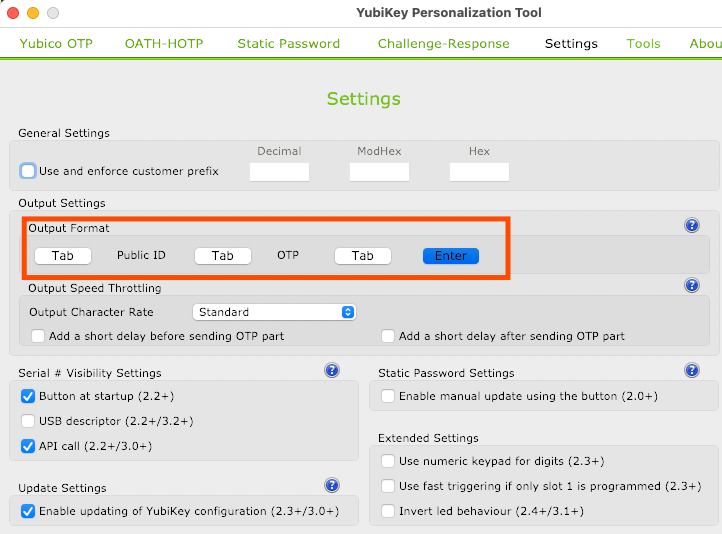
> Note: For passwordless logins the user will need to press the Enter with their Yubikey plugged in to unlock their screen.
You can use the "yubikey personalization tool" to change the format of the yubico otp that it emits, including appending a enter key. This is the way you'd want it set up for that, with the "tab"s unselected and the "enter" selected: https://cdn.zappy.app/791c95f1c203ef39fb71ea2809aa82a6.png
The auto lock on device removal with udev rule would be the same idea, in fact you could use any USB device like a basic flash drive if you wanted. Changing PAM's login to use the device for login would require a bit more device-specific stuff--I'd search around to see if Safenet already provides a module to drive PAM auth.
Configure it how you want, e.g. 3-5 minute interval should do it. I don't think I type anything for more than 5 minutes without touching a mouse, I don't use vim that much nowadays.
I feel like these devices generally give the illusion of security while really giving an adversary a single device to target. As another user had suggested, using udev rules and some device encryption would likely be a much better option... if not as an alternative, at least in conjunction with something like this.
It's most likely easier to brute force a password than to break into someone's house. Would be easier to demand all credentials by gunpoint with that much effort.
That's a fair point, but that's not the only attack vector. I carry my token around on my keys which makes it vulnerable to being pick pocketed or just left behind somewhere. I think the original point was that you're just shifting your single authentication factor, not necessarily making it more secure. My key is only used for 2FA so even if someone were to get access to it, they'd have to know my password as well to get use out of it.
I just bought two yubikeys; a month later, I returned both. Here is a (major) problem. On a ubuntu box, I installed `libpam-u2f` and set it up for one user account. Turns out it breaks all other user accounts on this ubuntu box, meaning no other user could log in without the key. I contacted their support. No solution.
PAM is pretty flexible. Can't you just edit the configuration to only include the pam_u2f.so module for a certain user, or for users in a certain group? Or add the nouserok option[1] to allow authentication to proceed in the absence of registered U2F device?
The former approach would look something like this; the "default=1" part skips the next directive (pam_u2f.so) when the test fails (i.e. when the user is not in the mandatory_u2f group):
[1] https://developers.yubico.com/pam-u2f/ "nouserok … Set to enable authentication attempts to succeed even if the user trying to authenticate is not found inside authfile or if authfile is missing/malformed."
I guess you can write your own pam module and use maybe an argument (your username) as a parameter. Just talking hypothetically: I think it should be possible
To login to my work VPN, the password is "<my pin><output from the yubikey>". Our SSO system requires both once per day as well.
It's a great system and I highly recommend it.